
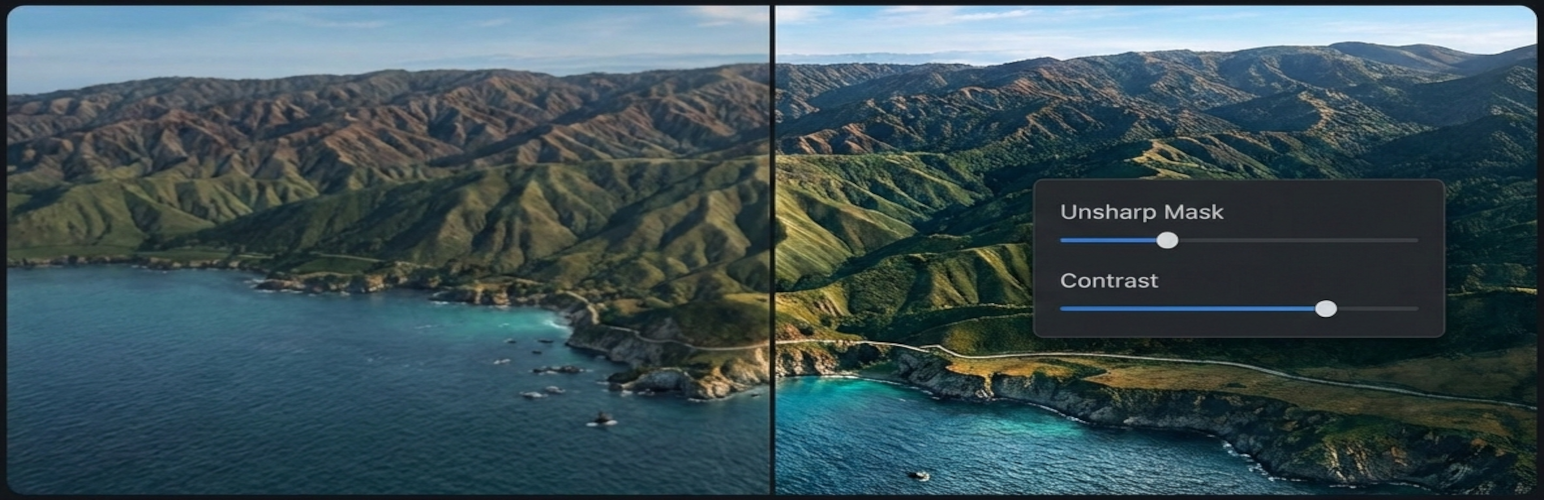
ProWoos built Advanced Pixel Editor to solve a real problem: WordPress doesn’t give you professional-grade image editing tools out of the box. Whether you’re adjusting contrast on a product photo or sharpening a portfolio image, you shouldn’t need to leave your WordPress dashboard to get it done right.
Advanced Pixel Editor brings ImageMagick-powered image processing directly into your Media Library workflow. The free version covers the essentials, and Advanced Pixel Editor Pro unlocks a full professional toolkit for photographers, agencies, and e-commerce stores.
Here’s everything you need to know about both versions.
Advanced Pixel Editor (Free)
The free plugin is available on WordPress.org and provides a solid foundation for image editing right inside WordPress.
Core Features
- Real-Time Preview — See filter changes instantly as you adjust the sliders. No need to save and reload.
- Contrast Adjustment — Professional contrast control with fine-tuned precision.
- Unsharp Masking — Advanced sharpening with full control over amount, radius, and threshold parameters.
- Before/After Comparison Slider — Draggable slider to compare your edits against the original, with full touch support on mobile devices.
- Multiple Save Modes — Save as a new image or replace the original. Custom filename input is available for new saves.
- Automatic Backups — When replacing an original image, a backup is created automatically. You can always restore the original with one click.
Media Library Integration
We designed the plugin to fit naturally into your existing WordPress workflow:
- An “Advanced Editor” button appears next to “Edit Image” in the Media Library grid view.
- An “Advanced Edit” link is added to the row actions in list view.
- The button also appears on individual attachment edit pages.
- Clicking any of these takes you straight to the editor with your image pre-loaded and ready to edit.
Built for Quality
- ImageMagick Processing — We use the Imagick PHP extension for superior results compared to GD. ImageMagick is available on most modern hosting platforms.
- Format Support — JPEG, PNG, GIF, and WebP.
- Accessibility — Full keyboard navigation and screen reader support (ARIA labels throughout).
- Security — Rate limiting, base64 image data validation, nonce verification, and capability checks on every request.
- Responsive Design — Works on desktop, tablet, and mobile screens.
Requirements
- WordPress 5.6 or higher
- PHP 7.4 or higher
- ImageMagick PHP extension (Imagick) — available on most hosting providers
Advanced Pixel Editor Pro
Advanced Pixel Editor Pro is a premium add-on that extends the free plugin with professional tools. It requires the free plugin (v3.1.0+) to be installed and activated. Pro features integrate directly into the same editor interface — no separate pages or complicated setup.
Batch Processing
Process multiple images at once instead of editing them one by one. Select 10, 50, or 100+ images and apply your filter settings in bulk.
- Real-time progress tracking with pause and resume
- Queue management with error handling and recovery
- Memory-optimized processing via WP-Cron continuation
- Preserves each image’s original format (no forced conversions)
Advanced Filters
A full suite of professional image filters, all with real-time preview:
- Color Adjustments — Brightness, saturation, and hue control
- Artistic Effects — Sepia tone for classic styling
- Enhancement — Auto levels for quick corrections
- Special Effects — Vignette, Gaussian blur, noise reduction, and emboss
Crop & Resize
Interactive crop and resize tools built directly into the editor:
- Interactive Crop Overlay — Drag any of the 8 handles to define your crop area
- Aspect Ratio Presets — Free, 1:1 (square), 4:3 (standard), 16:9 (widescreen)
- Resize with Aspect Lock — Scale images while preserving proportions
- DPI / Resample Control — Set resolution for print-ready output
Professional Watermarking
Protect your images with text or image-based watermarks:
- Text Watermarks — Custom fonts, sizes, colors, rotation, and opacity
- Image Watermarks — PNG/GIF logos with transparency, selected from your Media Library
- 9-Position Grid — Place watermarks precisely with a visual position picker
- Tiling — Repeat watermarks across the entire image for full coverage
- Batch Watermarking — Apply watermarks to multiple images at once
Coming Soon
- Bulk Export — Format conversion (JPEG, PNG, WebP), size optimization presets, custom naming patterns, and ZIP downloads
- Cloud Processing — Offload heavy processing to the cloud for large images and complex operations
Free vs. Pro: Feature Comparison
| Feature | Free | Pro |
|---|---|---|
| Contrast Adjustment | Yes | Yes |
| Unsharp Masking (Sharpen) | Yes | Yes |
| Real-Time Preview | Yes | Yes |
| Before/After Comparison Slider | Yes | Yes |
| Save as New / Replace Original | Yes | Yes |
| Automatic Backups & Restore | Yes | Yes |
| Media Library Integration | Yes | Yes |
| JPEG, PNG, GIF, WebP Support | Yes | Yes |
| Brightness, Saturation, Hue | — | Yes |
| Sepia, Vignette, Blur, Emboss | — | Yes |
| Auto Levels & Noise Reduction | — | Yes |
| Interactive Crop with Presets | — | Yes |
| Resize with Aspect Lock | — | Yes |
| DPI / Resample Control | — | Yes |
| Text & Image Watermarks | — | Yes |
| Batch Processing | — | Yes |
| Bulk Export (coming soon) | — | Yes |
| Cloud Processing (coming soon) | — | Yes |
| Priority Support | — | Yes |
Pricing
The free version is and will always be free on WordPress.org.
Advanced Pixel Editor Pro is available in three tiers:
- Personal — $29/year — 1 site license
- Professional — $99/year — 5 site licenses
- Agency — $199/year — 20 site licenses
All plans include priority support and access to all current and upcoming Pro features.
Who Is It For?
The free version is ideal if you need quick contrast and sharpness adjustments without leaving WordPress. It’s lightweight, secure, and gets the job done for bloggers and casual users.
The Pro add-on is built for professionals who need more:
- Photographers — Batch processing saves hours when editing large photo sets
- E-commerce Stores — Consistent product image editing with watermarking for protection
- Design Agencies — Advanced filters and crop tools for client work without leaving WordPress
- Content Creators — Quick image optimization and formatting for social media and blog posts
Supporting Open Source
We’re proud to support the Open Source community. 20% of all Advanced Pixel Editor Pro proceeds are donated directly to the ImageMagick project — the powerful image processing library that makes this plugin possible.
Your purchase helps sustain free software that powers professional image processing for millions of websites worldwide.
Get Started
- Download Advanced Pixel Editor Free on WordPress.org
- Get Advanced Pixel Editor Pro on prowoos.com